
This article explains why this error appears during the Payroll Year End process and how to resolve it so you can complete the Payroll Year End successfully.
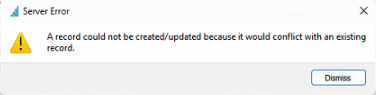
If you encounter this issue, it usually means payroll schedules for the upcoming year have already been created before running Payroll Year End.
How to Resolve the Issue
Step 1 — Remove future payroll schedules
Navigate to:
Go back to Payroll > Payroll Schedule.
Delete any schedules that belong to the next payroll year.
Step 2 — Re-run Payroll Year End
Once the future schedules are removed:
Return to Payroll Year End.
Run the process again.
Confirm it completes without errors.
Step 3 — Recreate Payroll Schedules
After Payroll Year End finishes:
Go back to Payroll > Payroll Schedule.
Recreate your payroll schedules for the new year as required.
Summary
To fix this error:
Delete any payroll schedules dated in the next payroll year.
Run Payroll Year End again.
Recreate payroll schedules only after Year End is complete.